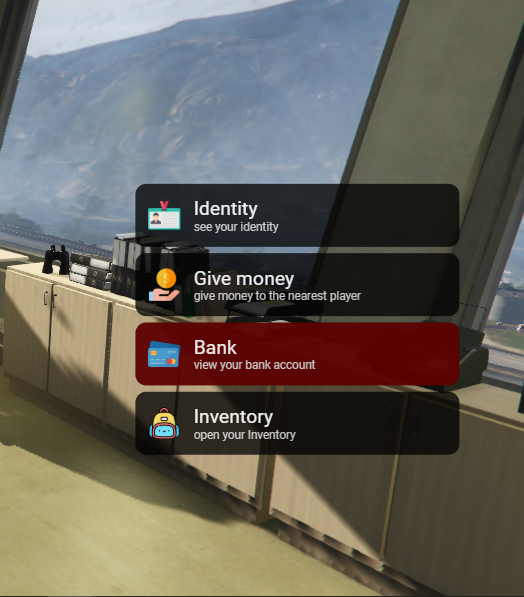
Explanation:
This is a simple “creator” of quick action menu, where it is possible to insert the option in conjunction with an icon image. This menu was thought to be a Simple Player Menu, that is, do not buy thinking about using it for complex things like barbershop or clothes shop.
Features:
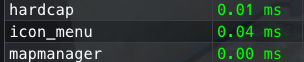
Resmon:
This feature can be very good for those who use fast-acting menus, as its CPU usage is extremely low, even when the menu is open. The maximum captured when he arrived was 0.04ms.
How to use:
In your server.cfg, put:
ensure icon_menu
In the client_scripts of the fxmanifest.lua file of the script where you want to use this menu, put:
"@icon_menu/lib/IconMenu.lua"
Place the images you want to use in your menus in the folder "icon_menu/html/img/", note that it can only be images of the type .png, .jpg or .gif and if you are interested in placing another format, you must add the format at icon_menu/fxmanifest.lua.
To create and open a menu, use:
local myItems = {
        {img = "identity.png", text = "Identity", text2 = "see your identity", callBack = function() print('identity openned') end},
        {img = "givemoney.png", text = "Give money", text2 = "give money to the nearest player", callBack = function() print('give money openned') end},
        {img = "bank.png", text = "Bank", text2 = "view your bank account", callBack = function() print('my bank account openned') end},
        {img = "backpack.png", text = "Inventory", text2 = "open your Inventory", callBack = function() print('my inventory openned') end},
    }

IconMenu.OpenMenu(myItems)
You can also do something like:
local myItems = {}

for i = 1, 10, 1 do
    table.insert(
        myItems,
       {img = "myIcon.png", text = "My title item", text2 = "My description",
       callBack = function()
            TriggerEvent("chat:addMessage", {args={"I pressed " .. i}})
       end }
    )
end

IconMenu.OpenMenu(myItems)
If you want to change the settings for a single menu, you can pass a configuration object, as follows
local configs = {
    positionX   = "90%",
    positionY   = "50%",
    size        = "0.9", -- size in proportion
    maxHeight   = "80vh", -- maximum menu size ( recommended from 30vh a 80vh )

    itemColor = "rgba(0, 0, 0, 0.8)", -- background color of the items
    itemSelectedColor = "rgba(92, 1, 1, 1.0)", -- background color of the selected item
    text1Color = "whitesmoke", -- title text color
    text2Color = "rgb(206, 206, 206)" – description text color
}
IconMenu.OpenMenu(myItem, configs)
If you want to change the default settings for all menus, you can directly change the config_default variable in icon_menu/Client/Config.lua.
Example of a Menu being created and opened in another resource:
RegisterCommand("menu", function()
    local myItems = {
        {img = "identity.png", text = "Identity", text2 = "see your identity", callBack = function() print('identity openned') end},
        {img = "givemoney.png", text = "Give money", text2 = "give money to the nearest player", callBack = function() print('give money openned') end},
        {img = "bank.png", text = "Bank", text2 = "view your bank account", callBack = function() print('my bank account openned') end},
        {img = "backpack.png", text = "Inventory", text2 = "open your Inventory", callBack = function() print('my inventory openned') end},
    }

    local configs = {
        positionX   = "90%",
        positionY   = "50%"
    }

    IconMenu.OpenMenu(myItems, configs)
end)
Use to force a menu to close:
IconMenu.ForceCloseMenu()